Text-to-Speech (TTS) feature allows chapters to be read aloud using the voices available on your device. TTS uses your device's built-in or installed voice engines and is available directly from the chapter reading page within the Wuxiaworld app.
How to Access Text-to-Speech
Open any chapter in the Wuxiaworld app.
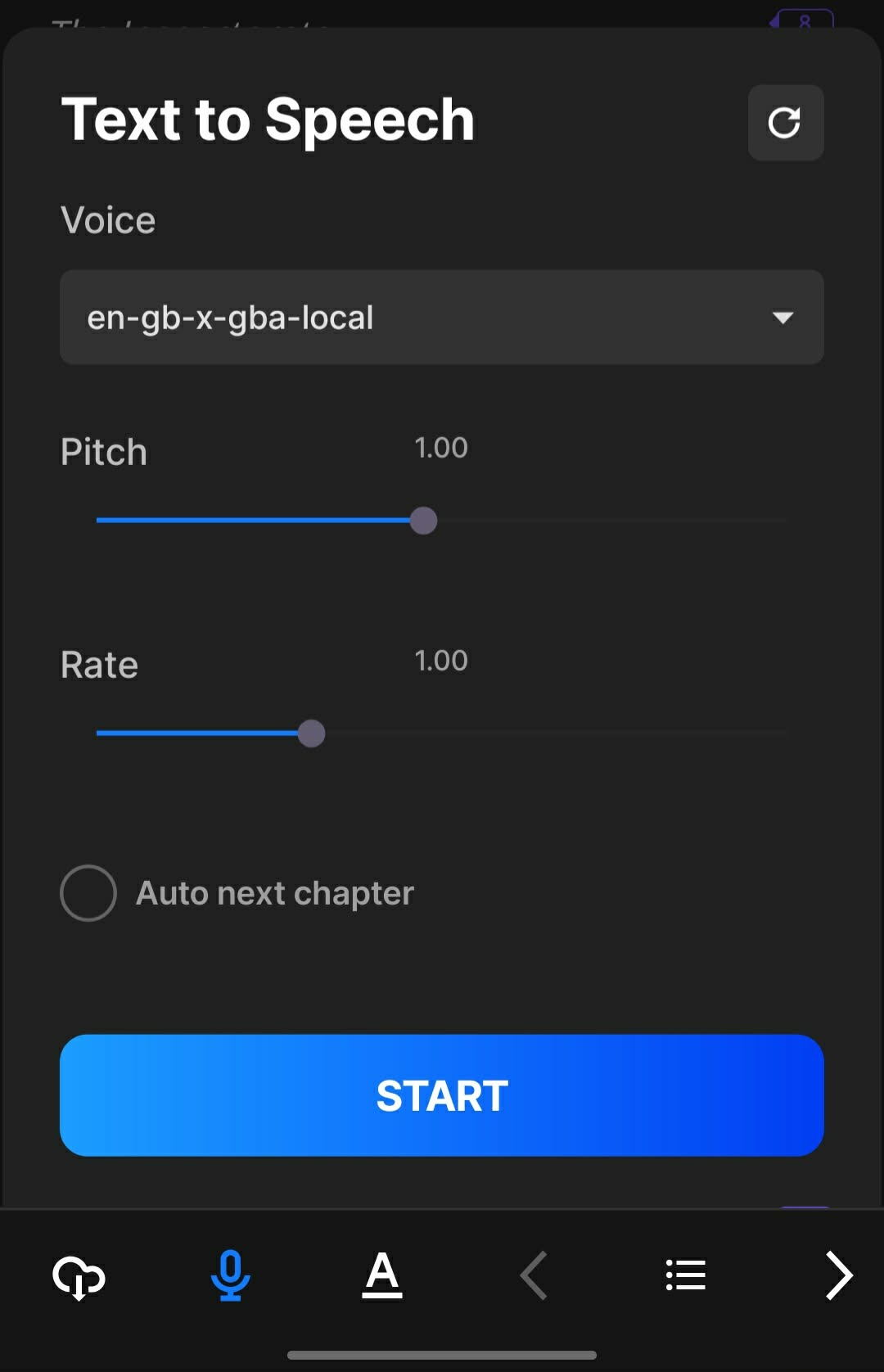
Tap the Microphone icon located in the bottom menu.
Select your preferred voice from the Voice dropdown option.
Adjust any desired settings.
Tap Start to begin listening.
Available Voice Options
The available TTS voices are managed by your device's operating system rather than the Wuxiaworld app.
Because of this, voice options may vary depending on:
Your device manufacturer
Operating system (iOS or Android)
Installed engine and voice packs
Device language settings
If you would like additional voice options, check your device settings and download any supported voices available for your device.
Apple (iOS)
Voice selections are managed through iOS settings and installed Apple voices.
Android
Voice selections are managed through Android's Text-to-Speech engine and any installed voice packs.
TTS Settings
The following settings can be customized while using TTS:
Voice Selection - Choose from the voices available on your device.
Pitch - Adjust the voice tone to sound higher or lower.
Speech Rate - Control how quickly the text is read aloud.
Auto Next Chapter - When enabled, TTS will automatically continue to the next chapter after finishing the current chapter.
Reset to Default Settings - A reset button is available in the top-right corner of the TTS settings menu. Selecting reset will restore all TTS settings to their default values, including the selected voice, pitch, speech rate, and Auto Next Chapter setting.
TTS Playback Controls
Once TTS is started, a playback bar will appear on the chapter page.
The playback bar includes:
Play/Pause button
Reading progress indicator
Current paragraph position
Reading Progress
The number displayed on the right side of the playback bar indicates the current paragraph being read out of the total paragraphs in the chapter.
Example:
10/100 = Paragraph 10 out of 100 paragraphs
50/100 = Paragraph 50 out of 100 paragraphs
A progress bar visually shows reading progress throughout the chapter.
Start Button
Selecting Start begins TTS playback.
If TTS was previously stopped, selecting Start again will begin reading from the start of the chapter.
Stop Button
Selecting Stop completely ends the current TTS session.
After stopping, selecting Start again will restart reading from the beginning of the chapter rather than resuming where playback ended.
Pause/Play Button
Once TTS is running, users can pause and resume playback using the Play/Pause button on the chapter page.
iOS Behavior - When resuming after a pause, TTS will continue from the next word that would have been read.
Android Behavior - When resuming after a pause, TTS will restart from the beginning of the paragraph that was being read when playback was paused.
Start TTS Here
Users can begin reading from a specific section of a chapter.
To do this:
Highlight or select text within the chapter.
Tap Start TTS Here.
TTS will begin reading from the selected paragraph instead of starting at the beginning of the chapter.
Automatic Chapter Scrolling
While TTS is playing, the chapter page will automatically scroll to follow the content currently being read.
This allows users to visually follow along with the narration without manually scrolling.
How Auto Next Chapter Works
If Auto Next Chapter is enabled:
TTS will automatically proceed to the next chapter when the current chapter finishes.
The next chapter must already be unlocked and accessible.
Playback will continue seamlessly through available chapters.
TTS will stop if:
The next chapter is locked.
The next page is a teaser page.
No additional readable chapter is available.
Background Playback
TTS can continue playing while the Wuxiaworld app is running in the background.
However, playback behavior may vary depending on:
Device manufacturer
Operating system restrictions
Battery optimization settings
Background activity permissions
Some devices may stop background playback if:
Background activity is restricted.
Battery optimization is enabled.
Another application interrupts audio playback.
Incoming Calls
If a phone call is received and answered while TTS is playing:
TTS will automatically pause.
Playback can resume after the call ends.
Alloy (AI Enhanced) Voice
Some novels include an exclusive Alloy (AI Enhanced) voice option.
Requirements
Access to the Alloy voice requires an active Champion Subscription for the applicable novel.
Important
The Alloy voice cannot be accessed through:
VIP Subscription
Ebook Ownership
Wait-to-Unlock (WTU)
Cultivation Keys
Karma Unlocks
Only an active Champion Subscription grants access to the Alloy (AI Enhanced) voice.
Novels Currently Supporting Alloy (AI Enhanced)
The following novels currently support the Alloy voice option:
Keyboard Immortal
Overgeared
Star Gate
Additional novels may support Alloy in the future.
Known Limitations
Some older novel chapters may experience Text-to-Speech issues due to legacy chapter formatting created before TTS support was implemented.
Potential issues may include:
Skipped content within tables
Skipped paragraphs
Skipped chapter sections
Inconsistent reading order
Auto-scrolling synchronization issues
Move to the next chapter before all content in the current chapter has been read (If auto next chapter is enabled).
These issues are typically caused by older HTML or CSS formatting structures that are not fully compatible with the current TTS system. While improvements to legacy chapter formatting are on our development roadmap, revisiting and updating older chapter content across the library is a large undertaking.
At this time, there is no estimated timeline for when these improvements will be completed.
Troubleshooting
I don't see many voice options.
The available voices come from your device's operating system. Check your phone settings to download additional supported voices.
TTS stopped after finishing a chapter.
Ensure that:
Auto Next Chapter is enabled.
The next chapter is unlocked.
The next page is not a teaser page.
Why can't I use the Alloy voice?
The Alloy (AI Enhanced) voice requires an active Champion Subscription for the supported novel. Other unlock methods do not provide access to the Alloy voice.
Why does TTS skip some content in older chapters?
Some older chapters may contain legacy formatting that is not fully compatible with the TTS system. This may result in skipped tables, paragraphs, or chapter sections.
Having Issues?
If you're experiencing issues with Text-to-Speech (TTS) that are not covered in this article, please contact our Support team and provide the following information when possible:
- Device model, Operating system and version
- Wuxiaworld app version
- Novel title and chapter number
- Screenshots or screen recordings of the issue
Providing these details helps us investigate and resolve TTS-related issues more efficiently.
Need assistance? Contact Support and we'll be happy to help.
Was this article helpful?
That’s Great!
Thank you for your feedback
Sorry! We couldn't be helpful
Thank you for your feedback
Feedback sent
We appreciate your effort and will try to fix the article